Order Online | Dealers Login


How To Adjust Varifocal Camera Lenses and Get Clear Picture
 
Specifications
Focal Length
3.5-8mm
6.0-15.0mm
2.8-12.0mm
12.0-30.0mm
5.0-50.0mm
Iris Type
DC-Auto Iris
DC-Auto Iris
DC-Auto Iris
DC-Auto Iris
DC-Auto Iris
Aperture
1.4-close
1.4-close
1.4-close
1.4-close
1.4-close
Mount Type
CS
CS
CS
CS
CS
CCD Format
1/3 Inch
1/3 Inch
1/3 Inch
1/3 Inch
1/3 Inch
ViewAngle(deg)
95-44
54-23
105-40
50-9
63-12
M.O.D.(meter)
0.3
0.3
0.3
0.3
0.3
Dimensions(mm)
38x44x48
38x44x61
44x38x61
35x47x70
50x50x66
Weight(gram)
90
102
110
135
175
           
Adjustment Of Clear Picture

1. Take off the two plastic covers of the lens and loosing all screws and mount the lens onto the camera.

2. Put the plug into the camera's socket and set the mode on DC for auto-iris type lens. Open the iris to some position for the manual-iris type lens.

3. Firstly zoom the front focal in wide position and adjust the back focal for a clear picture, then zoom the front focal in tele position and re-adjust the bace focal for another clear picture. Secondly, following these steps to get a suitable focus for your desired picture. Finally set the manual iris for a best picture and then tighten all screws.


Cautions

1. Lenses are precise device, do not put it on strong vibration, high temperature and humidity environments.

2. Do not watch at high bright objects such as sun on your eyes in case of injured.

3. Violently operations in screw the lens on or off the camera should be prevented.

4. Do not touch the glass by your finger. In case of this happens, please clean it with soft cloth soaking with a bit of ethanol.

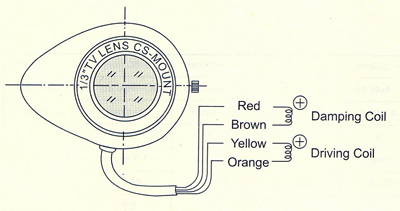
Connection


New Products Release

IP01/IP02/IP03 Smart IP Camera Long Distance Transmission Cabling Solutions, over CAT5 or Coax Cable up to 1.5KM.

IP04 Smart IP Camera POE(Power Over Ethnet) Repeater,maximum repeat range of 600M.

Wall Plate Mount Mutimedia AV CAT5 Transmission Solutions

TPP016VPD 16 Channel Video, Power, Data CCTV UTP Hub with UL Approved AC Power Supply

VDS2500 Two Video/Power/Aalrm Over One Coax Cable

GB001 Vidoe Ground Loop Isolator Built In Video BALUN

KM001 Keyboard Mouse Baluns(CAT5 Extender upto 300 feet)

TTP111VGA Passive VGA Baluns(CAT5 Extender upto 400 feet)

AD001 Analog Video to VGA convertor - turn your computor Monitor to CCTV Monitor!

VD102/105 CAT5 1 in 2 or 5 out VGA Distributor

CD816P Programmable Video Distributor and Switcher

TTP111VPK Video & Power Over CAT5

PTT-100VS Video Balun Built in Surge Protector and Noise Filter.


About Us | Privacy Policy | Contact Us | ©2003 FORESIGHT CCTV Inc.